
AntsData's scraper endpoints are async by default. Each scrape is a run (job): you submit it andimmediately get a run
id, it executes in the background, you poll byid, and once it succeeds you fetchrecords or download byid. You can also adddeliveryMode:"sync"to block for the terminal state; if youjust want search results in a single call, see Synchronous Search · Google SERP.
Prerequisites
- AntsData account (Sign up)
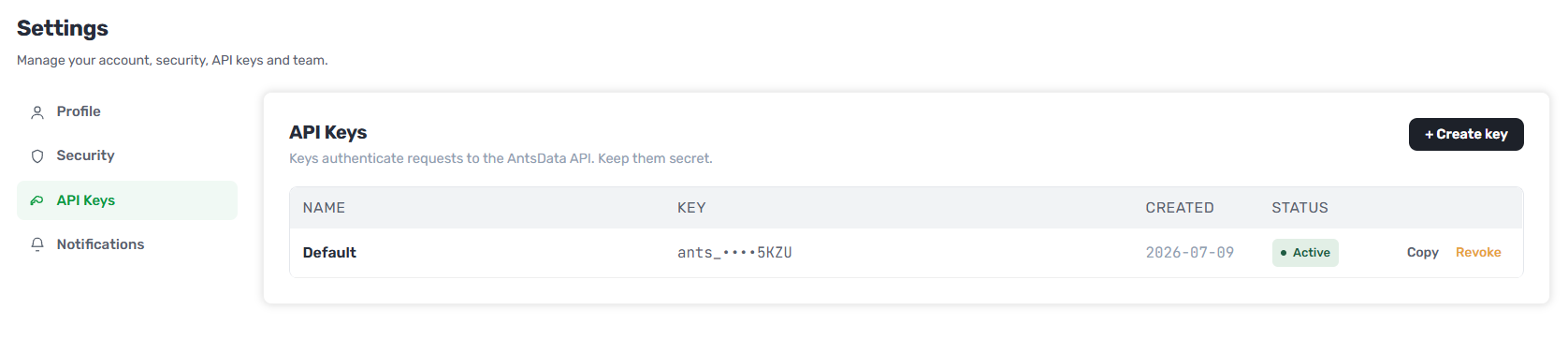
- API Key (generate in Console, format
ants_xxxxxxxxxxxx) - Python 3.8+ / Node.js 16+ or cURL
Step 1: Submit a Scrape Job (Create a Run)
Example: scrape two TikTok profiles. The default is "pull" mode — submit, poll, then fetch records; no callback required:
curl -X POST "https://api.antsdata.com/v1/scraper/tiktok/profile" \
  -H "Authorization: Bearer YOUR_API_KEY" \
  -H "Content-Type: application/json" \
  -d '{
    "deliveryMode": "async",
    "recordLimit": 1000,
    "targets": [
      { "username": "khaby.lame" },
      { "username": "nike" }
    ]
  }'
| Field | Required | Description |
|---|---|---|
deliveryMode |
✅ | async (submit + poll/fetch, returns 201) or sync (block until terminal, see "Sync mode" below) |
recordLimit |
— | Max records per target (default 1000; 0 = unlimited, capped by available credits) |
targets |
✅ | Array of targets (≥1); each element's fields are listed in the platform guide |
deliveries |
— | Optional: configure a webhook (etc.) to push results automatically; omit it to poll + fetch (pull). Not supported with sync |
Optional push: to have results pushed to your service on completion, add
deliveries:"deliveries": [{ "channelType": "webhook", "config": { "url": "https://your.app/hook" }, "outputFormat": "json" }].
Sync mode (
deliveryMode: "sync"): best for small jobs. The server blocks until the scrape finishes, then returns by outcome:
- Completed (terminal within the server's timeout window) →
200+ run object (statusissucceeded/failed, includestasks[]); thenGET .../recordsas usual (skips the polling loop).- Not finished in time →
202+ run object (withid,statusstillqueued/running); the job keeps running in the background — switch to pollingGET /v1/scraper/runs/{id}.
syncis a best-effort fast path, not a completion guarantee (large / multi-target jobs fall back to 202). ⚠️ Not idempotent: retrying after a client-side timeout creates a duplicate run and holds credits again — confirm via the returnedidbefore retrying.
Response (HTTP 201) — note the id; it's the job number for every follow-up query:
{
  "code": 0,
  "message": "ok",
  "data": {
    "id": 1287345,
    "actorName": "TikTok",
    "endpointName": "Profile",
    "status": "queued",
    "targetCount": 2,
    "maxCost": "2.0000",
    "chargedCredits": "0",
    "createdAt": "2026-07-06T09:00:00Z"
  }
}
Submitting holds the
maxCostcredits (not a charge); on success you're settled by actual output, and a fully-failed run is released with no charge.
Step 2: Poll the Run Status
Query by id until it reaches a terminal state succeeded or failed (back off 1s→2s→5s):
curl "https://api.antsdata.com/v1/scraper/runs/1287345" \
  -H "Authorization: Bearer YOUR_API_KEY"

{
  "code": 0,
  "message": "ok",
  "data": {
    "id": 1287345,
    "status": "succeeded",
    "targetCount": 2,
    "targetsOk": 2,
    "targetsFailed": 0,
    "recordCount": 2,
    "chargedCredits": "0.0040",
    "tasks": [
      { "targetIndex": 0, "taskId": "1279...41", "submitState": "submitted", "status": "succeeded", "recordCount": 1 },
      { "targetIndex": 1, "taskId": "1279...42", "submitState": "submitted", "status": "succeeded", "recordCount": 1 }
    ]
  }
}
- Only 4 statuses:
queued→running→succeeded|failed(the last two are terminal). - Progress is by counts:
targetCount/targetsOk/targetsFailed(no percentage). - Per-target success/failure is in
tasks[]: a failed target hasstatus:"failed"and anerrorMessage; other targets can still succeed (partial success still yields data and is billed).
Step 3: Fetch the Data
Once the run is succeeded, fetch records by id, paginated:
curl "https://api.antsdata.com/v1/scraper/runs/1287345/records?page=1&pageSize=20" \
  -H "Authorization: Bearer YOUR_API_KEY"

{
  "code": 0,
  "message": "ok",
  "data": {
    "total": 2,
    "page": 1,
    "pageSize": 20,
    "items": [
      { "username": "khaby.lame", "nickname": "Khaby Lame", "followers": 162000000, "isVerified": true },
      { "username": "nike", "nickname": "Nike", "followers": 302000000, "isVerified": true }
    ]
  }
}
Or download the whole result (format: json / csv / excel):
curl "https://api.antsdata.com/v1/scraper/runs/1287345/download?format=csv" \
  -H "Authorization: Bearer YOUR_API_KEY" -o result.csv
The fields of each record (
items[]) depend on the platform/endpoint — see "Output fields" in each platform guide. Fetching records before the run succeeds returns an empty set.
Full Example (Python: submit → poll → fetch)
import requests, time

BASE = "https://api.antsdata.com/v1"
H = {"Authorization": "Bearer YOUR_API_KEY", "Content-Type": "application/json"}

# 1. Submit
run = requests.post(f"{BASE}/scraper/tiktok/profile", headers=H, json={
    "deliveryMode": "async",
    "recordLimit": 1000,
    "targets": [{"username": "khaby.lame"}, {"username": "nike"}]
}).json()["data"]
run_id = run["id"]

# 2. Poll
for delay in [1, 2, 5, 5, 5, 5, 5]:
    r = requests.get(f"{BASE}/scraper/runs/{run_id}", headers=H).json()["data"]
    if r["status"] in ("succeeded", "failed"):
        break
    time.sleep(delay)

# 3. Fetch
if r["status"] == "succeeded":
    page = requests.get(f"{BASE}/scraper/runs/{run_id}/records",
                        headers=H, params={"page": 1, "pageSize": 100}).json()["data"]
    print(f"{page['total']} records | charged {r['chargedCredits']} credits")
    for item in page["items"]:
        print(item)
else:
    print("Run failed:", [t.get("errorMessage") for t in r["tasks"]])
Billing
Billed by the number of successfully produced records (one unit price per 1,000 records):
- Hold on submit:
maxCost = targetCount × ⌈recordLimit/1000⌉ × unit price; insufficient balance → submit is rejected (HTTP 402). - Settle on success:
chargedCredits = ⌈successful records / 1000 × unit price⌉(never exceeds maxCost). - Release on full failure: when a run is
failed, the hold is released and nothing is charged.
Per-endpoint prices and plans are on the Pricing page.
Error Handling
Unified envelope errors: real HTTP status code + {code, message}.
r = requests.post(f"{BASE}/scraper/tiktok/profile", headers=H, json=payload)
if r.status_code == 201:
    run_id = r.json()["data"]["id"]     # submitted
elif r.status_code == 401:
    print("Auth failed — check your API Key")
elif r.status_code == 402:
    print("Insufficient credits — top up")
elif r.status_code == 429:
    print("Rate limited — slow down")
else:
    print("Submit failed:", r.json().get("message"))
| Code | Meaning | Action |
|---|---|---|
| 400 | Invalid params/targets | Check targets fields |
| 401 | Invalid API Key | Check your key |
| 402 | Insufficient credits | Top up |
| 404 | Run not found | Check the run id |
| 429 | Rate limited | Slow down, see Retry-After |
| 500 | Server error | Retry later |
Full envelope, state machine and billing details: see Auth & Error Handling.
Next Steps
- Scraper platform guides: TikTok · X · Instagram · Facebook · LinkedIn · Google · YouTube · Amazon
- Synchronous search: Google SERP — results returned in a single call
- Auth & Error Handling — Unified envelope, run state machine, billing & error codes
FAQ
Q: Why isn't data returned directly on the call?
Scraping is asynchronous: you submit and get a run id, it executes in the background, and you poll by id to fetch results. This is what makes large, multi-target, downloadable jobs possible.
Q: Can I scrape multiple targets at once?
Yes. targets is an array; one run can contain many targets, executed in parallel, with per-target status in tasks[].
Q: What programming languages are supported?
Any language that supports HTTP. Official examples in Python / Node.js / cURL.
Q: Am I charged for failed scrapes?
No. A fully-failed run releases the hold and isn't charged; partial success is billed only by the records actually produced.
Q: How long are results kept / in what format?
Results can be paginated or downloaded as json/csv/excel, kept for ~90 days — fetch them promptly.